
by Design Workshop Sydney
Oct29
Setting up Master pages is a crucial element of an Indesign template document, and will greatly increase the user’s efficiency and workflow. We demonstrate how in our Adobe Indesign training courses. Together with auto page numbering and the addition of paragraph styles and character styles, Master pages form the basic structure of the design. Basically anything on a Master page... Read more...

by Design Workshop Sydney
Oct29
The Pathfinder set of tools in Adobe Illustrator is a very useful collection of functions which assist in the creation of complex shapes. We show you how to use these handy tools in our Illustrator training courses. To create the snowflake shape illustrated here on the bottom right we would first of all create a square 25 by 25 mm... Read more...
by Design Workshop Sydney
Oct16
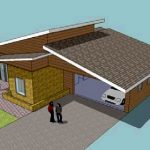
The three organizational elements of SketchUp are groups, components and layers. We discuss all three in our SketchUp training courses. The first two elements are discussed in other blog posts, but here we’ll look at the use of scenes to reveal the various layers of a model. For example, in the model of a house or renovations we could set... Read more...

by Design Workshop Sydney
Oct16
In order to get the best results from lighting and shadow effects in Autocad 3d it’s necessary to create a surface plane on which our created objects rest. We show you how in our Autocad 3d training courses. To create a surface plane in Autocad 3d first type planesurf into the Command line or at the Dynamic Input field. Then... Read more...

by Design Workshop Sydney
Oct16
Autocad 2d multileaders are used to point out aspects of a drawing. We show you how to create these useful annotations in our Autocad 2D training courses. Multileaders are basically lines of text, or sometimes objects, with an arrow pointing to a feature within our drawing. We add multileaders in Model Space generally. It’s a good idea to first create... Read more...

by Design Workshop Sydney
Sep27
Creating a crack effect in Photoshop is a simple matter of creating a custom brush. We show you how in our Adobe Photoshop training courses. First source an image of lightning from the internet, and open it up in Photoshop. Go the the Channels panel and click on each channel to find out which one defines the lightening effect best... Read more...

by Design Workshop Sydney
Sep27
Character styles in Indesign serve the purpose of consistency within your documents, and is a topic we look at in our Adobe Indesign training courses. Along with Paragraph Styles and Object Styles, Character Styles help us to keep our formatting consistent across either one document or many documents, and as such feature as one of the main ingredients of a... Read more...

by Design Workshop Sydney
Sep27
The Illustrator Blend tool is a fast and easy way of creating precisely graduated increments of colour between several identical objects. We demonstrate this valuable tool in our Adobe Illustrator training courses. First of all create a new document in Illustrator, 100 x 100 mm, using the RGB colour mode, for example. Then create a rectangle with the Rectangle tool... Read more...

by Design Workshop Sydney
Sep21
Creating complex roofs in SketchUp can be simple if you use the Follow Me tool. We demonstrate how in our SketchUp training courses. Once you have the building footprint all you need to do is create a profile for the roof, so first draw the ceiling profile or building footprint. Use the Offset tool to offset by 900mm for the... Read more...

by Design Workshop Sydney
Sep21
Adding materials is the next step in the Autocad 3d modeling process; we show you how in our Autocad 3d training courses. Firstly go to the View drop-down menu and choose Tool Palettes to open up Autocad’s default materials. Simply right-click on the tabs to see the full material sets; click on Woods and Plastics, for example. Select Woods-Plastics.Finish Carpentry.... Read more...

 Graphic Design Courses