
by Design Workshop Sydney
Mar23
Adding a glow effect in Adobe Photoshop can add an extra dynamic element to your design, and is incredibly easy to do. We show you how in our Photoshop courses. In the image shown here, we first of all cut out the robot image using a variety of selection tools – see other blog posts for some useful selection techniques.... Read more...

by Design Workshop Sydney
Mar7
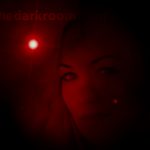
Gradients are blends between two or more colours, and can be used in Photoshop either as backgrounds, or as part of a layer mask. The example here shows both uses and is something we cover in our Photoshop courses. Firstly, as a background, it’s a simple matter to select two colours initially at the bottom of your toolbox. Then go... Read more...
by Design Workshop Sydney
Feb28
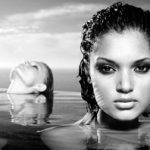
There are dozens of filters which ship with Adobe Photoshop. Some of these are purely functional, in the sense that they sharpen images or remove noise. Others are more aesthetic. We explore both types in our Photoshop courses. In this example of a mockup for a web banner, the basic Clouds filter was used from the Render subset in the... Read more...
by Design Workshop Sydney
Feb23
There are many techniques for creating stunning black and white images in Photoshop. We show you several of these in our Photoshop beginners’ courses. You could, of course, simply desaturate the colour information out of the image, but there are other, equally simple techniques that will give greater tonal depth and dynamism to the image. Here are just two methods... Read more...
by Design Workshop Sydney
Feb16
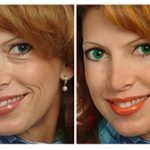
One of the main processes in Photoshop is the ability to retouch images. Incredible before and after shots are quite common in the media, but the procedure and skills involved are pretty simple. This is one of the many techniques we look at in our Photoshop courses. Before any retouching is done we would do some colour correction. This can... Read more...

by Design Workshop Sydney
Feb7
Adobe Photoshop is the the industry-leader in image-editing software used by professionals the world over. The program is also used widely in the fashion industry, from adjusting photo shoots to preparing storyboards and artwork for published brochures or websites. In our specially customized Photoshop for Fashion course we will help you explore the main features of the program, as well... Read more...

by Design Workshop Sydney
Jan31
Cutting out backgrounds in Photoshop is pretty straight-forward. This is known as deep etching in the printing industry, and is used where you want to extract an item like a logo or a human head from its background, to be placed onto a web banner or a header or footer. This is one of the many functions we explore in... Read more...

by Design Workshop Sydney
Jan24
Backgrounds in Photoshop come in all shapes and sizes, from a simple faded image to a simple gradient; from blended images to repeat patterns, to special effects like the cinematic bokeh effect. Like most features in Photoshop, once the basic tools and workflow is understood, the rest is up to the imagination of the user (which can be a drawback!).... Read more...

by Design Workshop Sydney
Jan17
A great way to add interest to a website is by adding animated gifs, and they are easy to create in Photoshop. This is one of the many dynamic functions we look at in our Photoshop courses. First create a new file – the dimensions will vary according to the appearance of your web pages – check with your web... Read more...
by Design Workshop Sydney
Jan9
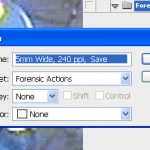
Photoshop actions are used for any repeatable task that can be easily automated, this saving you hours of tedious, labour-intensive work. In our Photoshop courses we look at some common uses for this handy function. For example, you may have 200 photographs uploaded onto your computer from your camera. The images are too big and you want to resize them... Read more...

 Graphic Design Courses